

To transfer domain name .com accounts safely to a new provider, you do not need to be a senior network engineer or pay massive administrative fees.
Just last Tuesday right after lunch, my friend Sheikh texted me in a complete panic. Sheikh runs a local organization, and his corporate .com domain was expiring in about a week.
His previous vendor had just sent him an invoice for over RM250 just to renew a single domain name — more than double the standard market price. When Sheikh looked closely at the bill, he realized the vendor was stacking hidden “administrative charges” on top of the actual renewal fee.
To make matters worse, Sheikh was terrified that moving his domain on such short notice would crash his office email or take his website offline during the middle of the work week.
We stepped in, contacted the service manager at Exabytes, and executed a clean migration in less than 24 hours. Because his web hosting was already sitting safely at Exabytes, leaving his existing domain settings untouched during the waiting period guaranteed zero downtime.
Here is the exact 3-step playbook we used to save Sheikh’s domain and money.
3 Simple Steps to Transfer Domain Name .com (Min. Downtime)
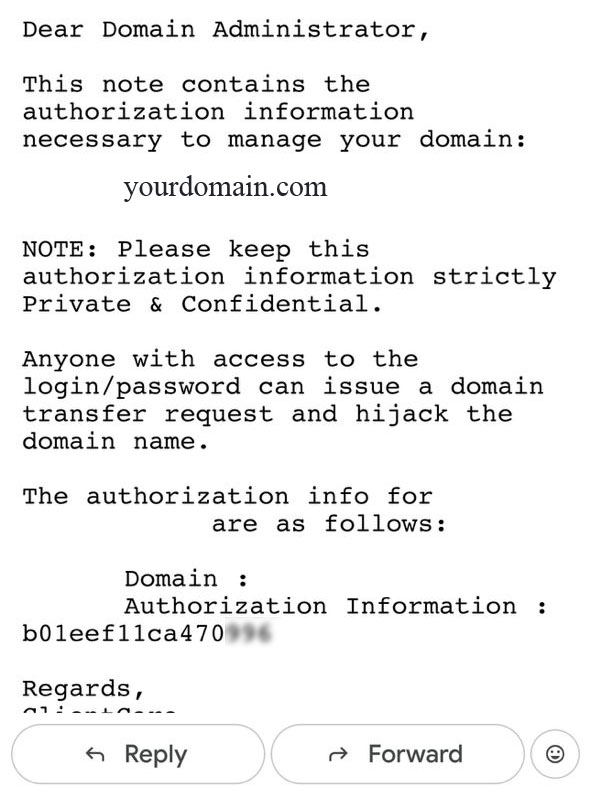
Step 1: Request Your Secret EPP Code
Every registered domain name has an official digital lock. To move your .com address to a new registrar, you must request the master key from your current vendor.
- Ask for the EPP / Authorization Code : Log into your current provider’s client portal or send an urgent email to your account manager asking for your “EPP Code” (sometimes called an Auth Code).
- Ensure the Domain is Unlocked : Ask them to toggle the domain status to “Unlocked” for transfer.
- Verify the Admin Email : Make sure the administrative contact email listed on the domain account belongs to you, not the old agency.
Step 2: Hand the Key to Your New Registrar
Once Sheikh obtained his EPP code from the old vendor, the heavy lifting was essentially over.
- Submit the Transfer Request : Go to your new hosting portal (such as Exabytes) and select “Transfer Domain.”
- Enter the Secret Code : Paste the EPP code into the security field and select .com.
- Pay the 1-Year Standard Renewal : Pay the standard transfer fee. This payment automatically adds 1 full year to your domain’s lifespan on top of your existing expiration date—meaning you never lose the days you already paid for.
Step 3: Confirm via Email and Wait
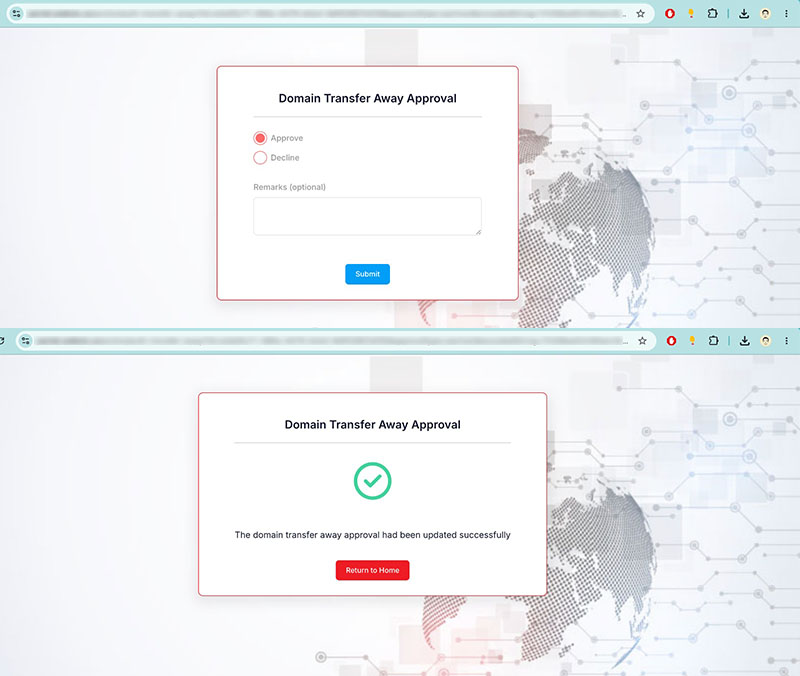
After payment is submitted, the registry kicks off an automated safety check to prevent domain hijacking.
- Click the Verification Link : Check your email inbox for an automated approval message from the global domain registry.
- Approve the Release : Click the link that asks “Do you confirm the transfer of this domain name?”
- Enjoy Minimum Downtime : The background migration takes between 5 to 7 days to finalize completely. During these 7 days, your website and emails remain 100% active because your active DNS records stay pointing to your live host until the final handover finishes.
Once the migration completed, we simply logged into Sheikh’s central Exabytes dashboard, verified his DNS settings, and consolidated his web hosting and domain under one clean, affordable bill.
Frequently Asked Questions (FAQ)
-
Q1: Will my website or corporate email go down during the 7-day transfer window?
Web Doc Answer : No. As long as you do not change your Nameservers (NS) or delete your hosting account during the move, your domain continue pointing to your existing server without a single second of interruption.
-
Q2: What happens if my old vendor refuses to give me my EPP code?
Web Doc Answer : Under ICANN regulations, domain registrars are legally obligated to provide your EPP code within 5 calendar days of your request. If a vendor refuses or holds your code hostage, you can file a formal complaint directly with ICANN.
-
Q3: Why is my .com domain transfer failing or showing "Locked"?
Web Doc Answer : A transfer will fail if your domain has "Transfer Lock" enabled in the backend, if it was registered or transferred within the last 60 days, or if there is an active payment dispute with your current registrar.
Protect Your Website Backend
Don't let silent technical debt, outdated plugins, or malware ruin yr online reputation. Keep yr digital front door locked, fast, and secure 24/7.
Secure Your Business Email
Ensure yr everyday client proposals and invoices land safely in main inboxes—never in spam folders—with clean enterprise cloud infrastructure like M365.