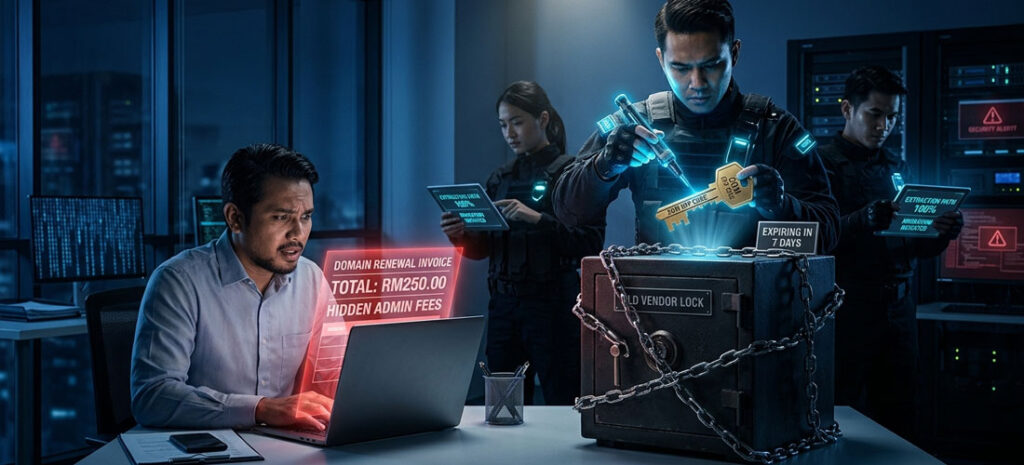

If you are looking into real-world WordPress malware removal, issues rarely start with a dramatic red alert screen or a ransom demand. Most digital disasters happen silently behind the scenes while everyday business carries on as usual.
WordPress Malware Removal: Why "No Maintenance" Nearly Ruined Encik Razak
The Day a "Quiet" Website Hijacked a Bank
It was a normal Friday afternoon in Puchong. Encik Razak, the operations director of a regional industrial power plant maintenance firm, was having lunch with his engineering team.
Their corporate website had been up and running for about two and a half years. It was simple, professional, and straight to the point featuring their company profile, client credentials, and a list of heavy machinery maintenance services.
30 months earlier, right after we handed over the completed site, we sat down with Razak over coffee and recommended our routine Web Care plan.
Razak laughed, waved his hand gently, and gave us the classic Malaysian boss response:
“Boon, we do power plant maintenance. Our company profile and engineering services won’t change every month. The content stays the same, so why pay a monthly maintenance fee? Keep it simple lah.”
There was a heavy irony in that statement. A company that made millions keeping massive power plant turbines running on strict preventive schedules assumed a digital engine running live on the public internet needed zero preventive care.
So, for 30 months, the site sat untouched. No core system updates. No security sweeps. No plugin patches.
To Razak, the site was working perfectly because when he typed his URL, the homepage loaded every time. But behind the scenes, the digital locks were rusting.
The Abandoned Shophouse Effect
To understand what was actually happening, think of a corporate website like a ground-floor shop office in a busy Klang Valley commercial square.
Even if you don’t change the products in your front display window, the physical building still ages. If you never visit the back door, check the padlocks, or test the alarm, dust builds up and the padlocks rust shut.
Hackers don’t sit behind dark screens manually typing away to target small local businesses. They launch automated scanning bots that sweep through thousands of Malaysian IP addresses every minute, checking for rusted locks.
When a bot stumbled upon Razak’s 30-month-old untouched site, it didn’t just break a window. It realized no landlord was checking the property, quietly broke through an outdated plugin backdoor, wiped out the original website along with its local database, and moved in.
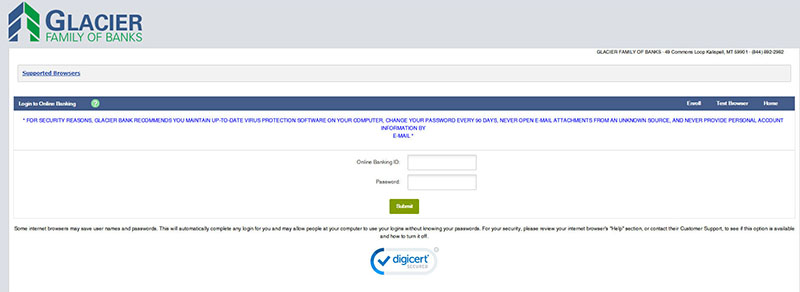
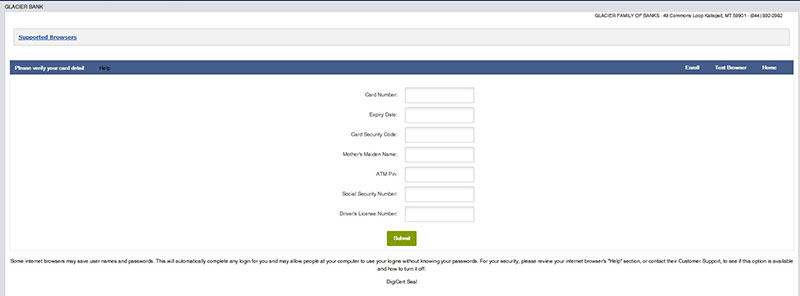
In its place, the squatters built a fully functional, counterfeit online banking login portal designed to steal credit card credentials from unsuspecting users.
💡 Dr. Web’s Diagnostic Note:
99% of SME website hacks are not personal. Hackers use automated scanning bots to look for ‘abandoned digital property’ — sites with outdated plugins and zero active care. Leaving a site unmaintained for 30 months doesn’t mean it stays safe; it just means the locks are rusted open for squatters to set up illegal operations without your knowledge.
Code Red: The Lunchtime Interruption
At 2:15 PM, my phone buzzed with a high-priority alert. It wasn’t from Razak. It was an urgent abuse notification sent directly from our server infrastructure team, forwarding an official legal demand:
“URGENT ABUSE REPORT: An active phishing site spoofing XYZ Bank has been detected operating from your server environment at [Domain Redacted]. Please investigate and terminate immediately.”
Below is the exact, alert email we received in our inbox:
To whom it may concern,
On behalf of XYZ Bank, I wish to report a phishing site using your services.
The phishing interface can be found on the following URL:
hXXps[:]//www[.]yourdomain[.]com[.]my/m/index.php
The legitimate and official interface can be found on the following URL:
https://www.xyzbank.com/
We would appreciate your help with taking down this phishing site.
Regards,
ABC Legal on behalf of XYZ Bank
We immediately pulled up the server diagnostic logs. The diagnosis was grim: Patient Zero (Razak’s site) had been completely overridden. Worse, the infection was active, aggressively probing the internal system to jump into neighboring client accounts on the same server.
The Condo Outbreak
To picture how dangerous this was, imagine living in a high-rise residential condominium with 250 units.
➡️ If a resident in Unit 8B catches a highly infectious virus but ignores the fever and keeps using the shared elevators, pressing buttons, and walking the hallways, the illness won’t stay inside Unit 8B.
Because Razak’s site had no active security guard watching its door, the automated malware breached his folder, elevated its permissions, and started knocking on the doors of adjacent websites sharing the same server environment.
We weren’t just dealing with one broken webpage anymore. We were sitting on a full-blown server outbreak.
Coming Up in Part 2...
In Part 2 (The Hospital Lockdown & The Surgical Cure), we put on the hazmat gear:
- How we deployed hospital-grade CDC lockdown protocols to isolate the entire server.
- The grueling, multi-day manual code surgery line-by-line through raw PHP system files.
- How we restored the patient using off-site vault backups and administered a permanent Web Application Firewall (WAF) vaccine.
Moral of the Story: Peace of Mind Beats Digital Fires
-
Q1: How often does a static WordPress site need updates?
Web Doc Answer: At least once a week. Plugin developers release security patches constantly to fix newly discovered vulnerabilities. Regular weekly sweeps keep yr site safe without disrupting yr layout.
-
Q2: Will updating plugins break my existing page design?
Web Doc Answer: If updates are done blindly, YES! That is why professional care involves backing up yr site first and testing updates in a staging environment b4 pushing them live.
Protect Your Website Backend
Don't let silent technical debt, outdated plugins, or malware ruin yr online reputation. Keep yr digital front door locked, fast, and secure 24/7.
Secure Your Business Email
Ensure yr everyday client proposals and invoices land safely in main inboxes—never in spam folders—with clean enterprise cloud infrastructure like M365.