
WordPress Security Maintenance is something many SME bosses assume they only need if they publish blog posts every week.
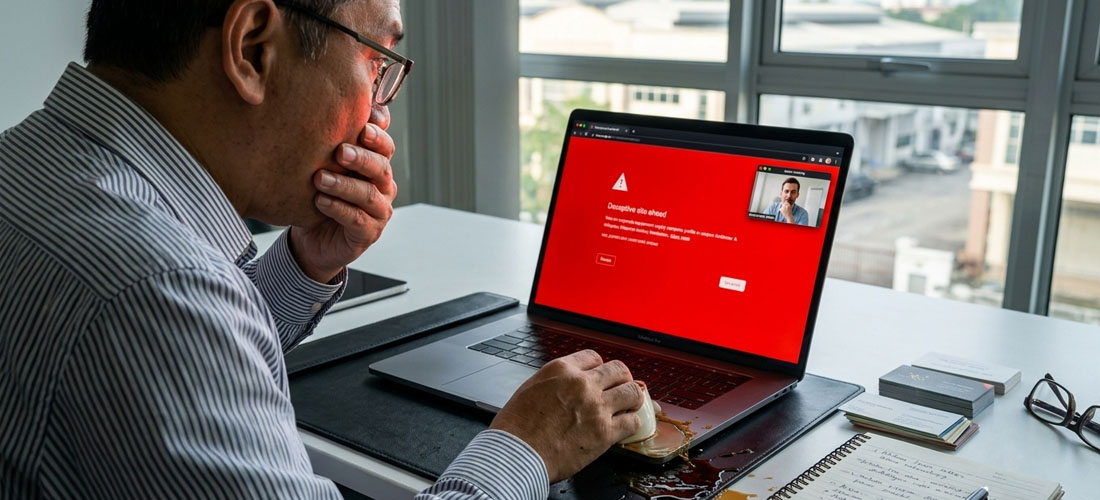
Tam, managing director of an industrial equipment supply firm in Glenmarie, thought the exact same thing. His company profile and product catalogue hadn’t changed since 2021. So when he logged on to present his catalogue to an overseas client over Microsoft Teams, his jaw dropped.
Instead of his product specs, a bright red alert covered the screen: “WARNING! : Deceptive site ahead.”
He called Boon (Web Doc) right away in a sweat.
Tam: “Boon! Why is Google blocking us?! We haven’t touched our site in 5 years! How can anyone hack a site that has no new content?”
Boon: “Relax, Tam. Last time u say don’t need maintenance mar, so this is actually what has been going on at the backend. A site with zero updates is like leaving a shop office locked up for 5 years without checking in or make sure the doors are locked. Software moves very fast even if yr text stays still. Let explain why it happened below. 👇”
Why My Static Website Still Need WordPress Security Maintenance?
Yes, u absolutely do. WordPress isn’t a printed paper brochure sitting on a coffee table. It is an active software engine built on database codes, server protocols, and third-party plugins.
Even if u don’t touch a single word on yr pages, the hosting servers and web environment around u update constantly. Leaving yr backend untouched creates 3 silent operational risks.
Risk 1 : The Abandoned Office Shophouse (Bot Hijacking)
Think of yr site like an office shophouse in Subang Jaya. If u keep the glass clean and change padlocks regularly, people know someone is home. But if u leave it untouched, locks rust and dust builds up.
Hackers don’t sit behind screens picking on Tam’s company specifically. Automated scanning bots crawl the web 24/7 looking for abandoned digital shophouses with outdated plugin locks.
Once inside, they squat in yr server files to host hidden scam pages or blast spam without u ever knowing.
Risk 2 : The Unserviced Engine (Silent Lead Crashes)
U wouldn’t skip engine oil changes for yr delivery van just because u drive the exact same route from Shah Alam to Port Klang every day. If u ignore engine care, the oil turns to sludge and the engine seizes.
Web hosts regularly upgrade their underlying technology (like PHP server versions). When outdated plugins can’t speak to the new hosting engine, yr website silently crashes. The front door looks open, but customer inquiries vanish into thin air b4 reaching yr inbox.
Risk 3 : The Criminal Record (Blacklisted Reputation)
When squatters run illegal activities inside an abandoned shophouse and get caught, the owner gets dragged into questioning and ends up with a bad record.
When automated bots hijack yr unmaintained site, Google and anti-virus systems flag yr URL on global blacklists. Worse, yr corporate email domain gets flagged for spam, sending yr everyday business quotes straight to yr clients’ Junk folders.
Hackers rarely target small business sites manually. 99% of web intrusions are automated bots searching for known, unpatched plugin vulnerabilities.
Does Google's Red Warning Screen Block You From Entering The Site?
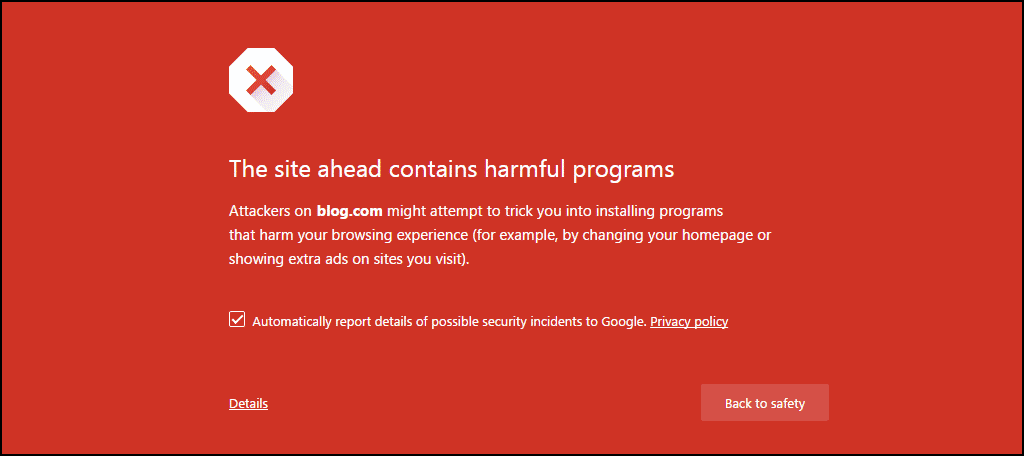
Yes, Google’s red warning screen will completely wall off yr visitors b4 they even see yr homepage. When Chrome, Firefox, Edge, or Safari detects malware, phishing scripts, or hijacked code, they drop a full-screen interstitial banner warning users that visiting yr domain may steal their data or infect their device.
While tech-savvy users can bypass it by clicking “Advanced” and forcing their way through, but 99% of normal clients will panic, close the tab, and head straight to yr competitor.
How Can I Know If I'm At Risk?
U don’t need to wait for a panicking client like Tam. Here are 3 simple ways to check if yr site is vulnerable or already flagged:
- Check Google Search Console (GSC) : Log into yr GSC account and check the “Security & Manual Actions” tab. If Google detected malicious activity on yr server, u’ll see an active security warning flagged there.
- Run a Free Security Scanner : Use diagnostic tools like Sucuri SiteCheck or VirusTotal to scan yr domain for known malware signatures, outdated server software, and blacklist status.
- Look Out for Silent Warning Signs : If yr site loads unusually slow, displays weird foreign language text in Google search snippets, or if yr everyday business emails suddenly bounce or hit spam folders, these are major signs that bot squatters are already inside.
It was mid-day on a Monday. I was wrapping up a team meeting with my partner when his phone buzzed on the table.
It was a frantic WhatsApp message from the Person-in-Charge (PIC) of a professional training and certification academy in Kuala Lumpur. He was in full panic mode: their corporate website had just been slammed with Google’s infamous bright red “The site ahead contains harmful programs” warning screen. Leads had stopped instantly, and prospective students were messaging them asking if the academy had been hacked.
— “Stay calm,” we told him. “Don’t touch anything. We’ll diagnose it right after lunch.”
The Security Audit & Cleanup Process
Immediately after lunch, we accessed the site’s backend to run a full diagnostic:
- Automated Malware Scan : We deployed Sucuri Anti-Virus, which quickly flagged multiple injected malware files and malicious redirects embedded deep within the site structure.
- Manual Code Inspection : Automated tools clean surface threats, but hackers often leave stealthy backdoors behind. We manually inspected core system files, theme scripts, and .htaccess code to purge every trace of injected malicious scripts.
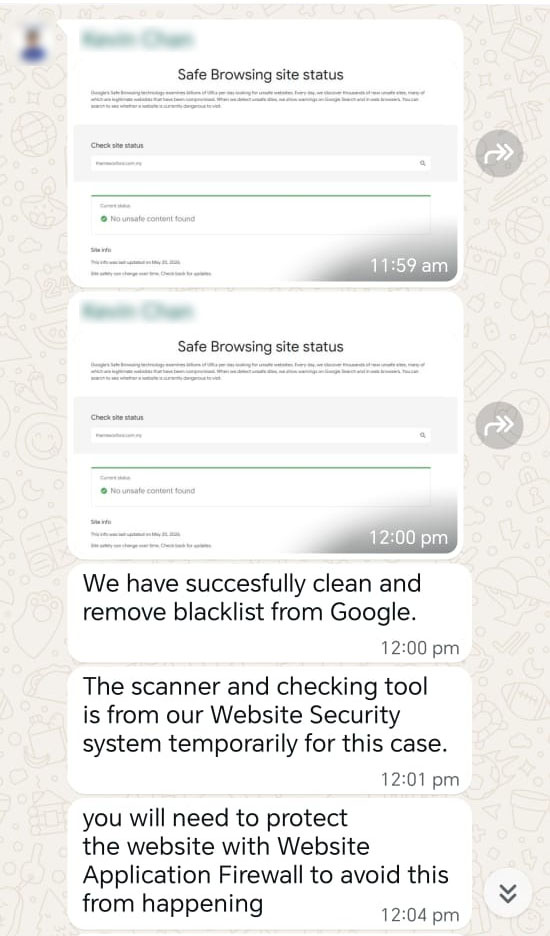
- Google Blacklist Delisting : Once the backend was completely sterile, we accessed Google Search Console, verified the fix, and formally requested a security review.
Moral of the Story: Peace of Mind Beats Digital Fires
Ignoring yr site backend just because yr text stays static is a gamble with yr company’s reputation. Handling basic care proactively keeps yr digital front door locked, yr inquiry forms healthy, and yr business emails landing where they belong—in yr clients’ main inbox.
Frequently Asked Questions About WordPress Security Maintenance
-
Q1: How often does a static WordPress site need updates?
Web Doc Answer: At least once a week. Plugin developers release security patches constantly to fix newly discovered vulnerabilities. Regular weekly sweeps keep yr site safe without disrupting yr layout.
-
Q2: Will updating plugins break my existing page design?
Web Doc Answer: If updates are done blindly, YES! That is why professional care involves backing up yr site first and testing updates in a staging environment b4 pushing them live.
Protect Your Website Backend
Don't let silent technical debt, outdated plugins, or malware ruin yr online reputation. Keep yr digital front door locked, fast, and secure 24/7.
Secure Your Business Email
Ensure yr everyday client proposals and invoices land safely in main inboxes—never in spam folders—with clean enterprise cloud infrastructure like M365.